22nd February 2024
26 February 2024
Purchase orders now show a Supplier Invoice Status column to track invoiced items. Shopify invoices exported to Xero or QuickBooks are automatically marked as paid, lead status colours are configurable, and a new {ItemSupplier} PDF variable is available for delivery notes.
NEW
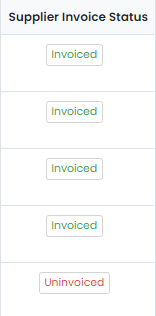
Track What Items Have Been Invoiced on a Purchase Order – Make the column ‘Supplier Invoice Status’ visible on the items’ grid:

Click on the ‘Load’ button shown in that column to show which items have been invoiced and which have not:
Shopify Invoices Automatically Marked as Paid in Xero and QuickBooks – When an invoice is generated from the Shopify integration and exported to Xero or QuickBooks, the payment is also exported. This means the invoices are marked as paid in both Xero/QuickBooks and Zigaflow. Fees are not exported but can be manually entered as one figure for all transactions at the end of the month into the Bank Fees ledger.
Leads/Opportunities Status Colors are now Configurable – Set these to your preferred colours.
PDF Variable for Item Supplier on Delivery Notes Added – Use {ItemSupplier} to show the selected supplier.