27th January 2025
29 January 2025
Delivery notes can now include zero-quantity items to show full order status to customers. Also adds flexi-import for suppliers and supplier contacts, improved sibling PO/delivery note status automation, a deleted pre-builds recovery button, and a reorganised user profile page.
NEW
Delivery Note Creation – Include zero quantity items on delivery note. Prior to this, an item would need to have a quantity to be added to the delivery note, but this makes it easier to show a customer the staus of all the items they have ordered:

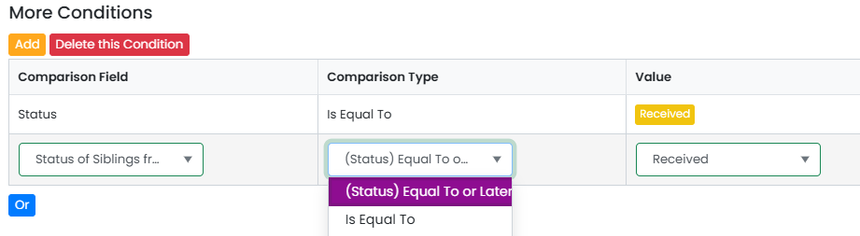
Moving the Status of a Job/Sales Order When All the Sibling PO’s or Delivery Notes Are Moved – Based on customer feedback from a couple of weeks ago, the automation has been improved so that when a PO or Delivery Note is moved to a certain status, the automation will check if its sibling POs or Delivery Notes are in that status or later. If that is the case, the action will be fired. Typically, this will be to move the parent job/sales order to a different status or notify a user.
Suppliers & Supplier Contacts Flexi-Import Added – This allows the selection columns in a spreadsheet to import, so a template import file doesn’t have to be used (and copied into).
Pre-Builds Deleted Button – Recover pre-builds that have been deleted easily.
User Profile Page Re-Arranged – With more logical grouping.