5th August 2024
13 August 2024
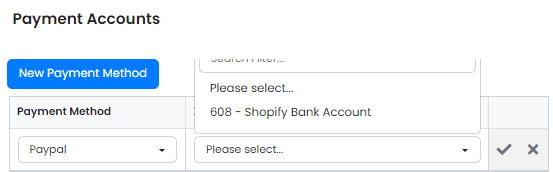
Shopify Payments can now be allocated to different Xero bank accounts per payment type via Cog - Financial Settings - Payment Accounts. New customers also default to the country set in your account settings.
NEW
Shopify Payments can be Allocated to Different Xero Bank Accounts – Set this up in the Cog -> Financial Settings ->Payment Accounts. Add an entry for each payment type you use and their corresponding bank accounts (make sure you import the bank accounts into Zigaflow first). Zigaflow will push the payment through to Xero from Shopify based on the payment method used for the Shopify transaction.
New Customers/Companies Set to Your Country – If you set up your country in your account settings, all new customers will default to this. Specific customers can be changed to a different country. This is to improve the quality of cross-country reporting.