Choose stock locations before running allocate all
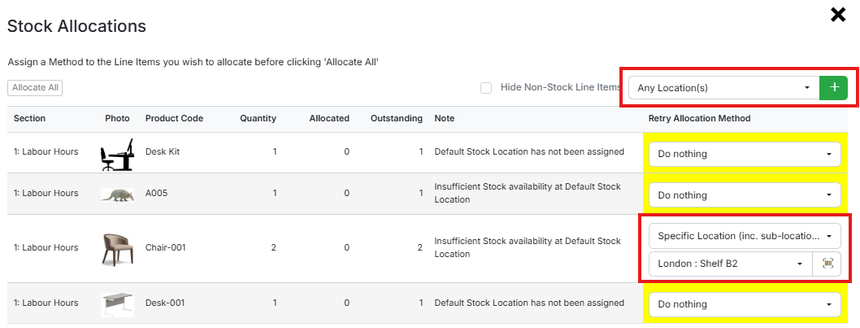
The Allocate All process now lets you select which locations to allocate stock from before it runs. A pop-up lets you set the rule for each item — from any location the system finds it in stock, or from a specific location — making stock allocation easier.
Allocating stock in bulk now gives you more control over where it comes from. The Allocate All functionality has been improved so you can select the locations to allocate from before running the process. A pop-up lets you set the rule for each item or product, either allocating from any location where the system finds it in stock or restricting it to a specific location of your choosing. This makes it much easier to allocate stock exactly how you want, ensuring items come from the right places rather than applying a single blanket approach across the board.