Document templates explained
The short answer
Document templates in Zigaflow are Microsoft Word files. You can edit them in the system, or download them, edit them and upload them again. Download a system template as your starting point, start with one module's templates, then copy them to the other modules. Keep static and expanding data in separate tables.
Document templates in Zigaflow are Microsoft Word files, making them easy to edit. They can be edited in the system or downloaded and uploaded after editing.
Recommended approach
- Download one or more system templates and use them as the basis for your new system. If your plan calls for a radically different structure and it doesn't make sense to base it on the system template, use it as an easy reference for the relevant PDF variables.
- Start on one module's templates (i.e. quotations), and when happy with it, copy it to the other modules, adjusting the variables and table columns to suit each module.
PDF Variables
PDF variables are used, identified by {curly brackets} and can be found in each module's document edit page here:

Document Structure
The document structures are the same in all the modules except for eForms.
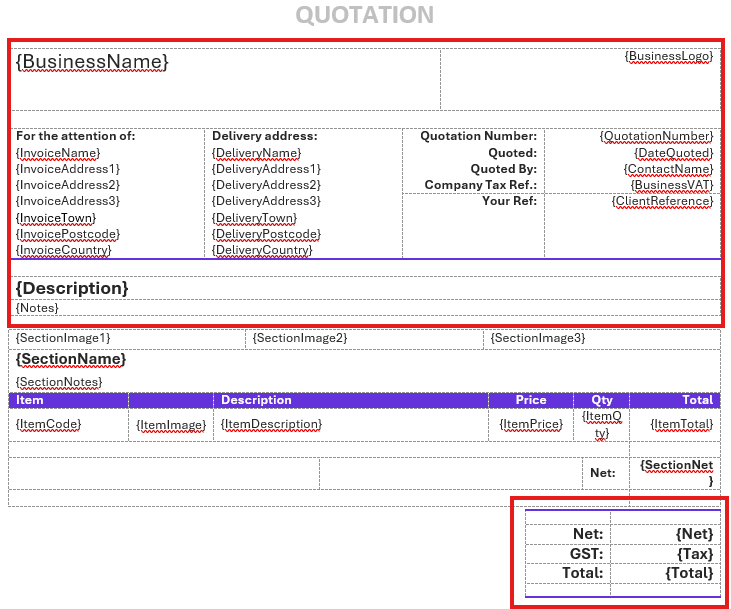
The best approach is to keep static and expanding data in separate tables. Static data can be placed in expanding data tables but will be repeated for each section or line item.
We recommend separating tables by one line or more to enhance their appearance and prevent the rendering process from merging them.
Static data
Such as the date quoted, customer name, total invoice value, etc.
Expanding data
Such as the items quoted or listed on a job or invoice. The template must show as many items as are in the source.
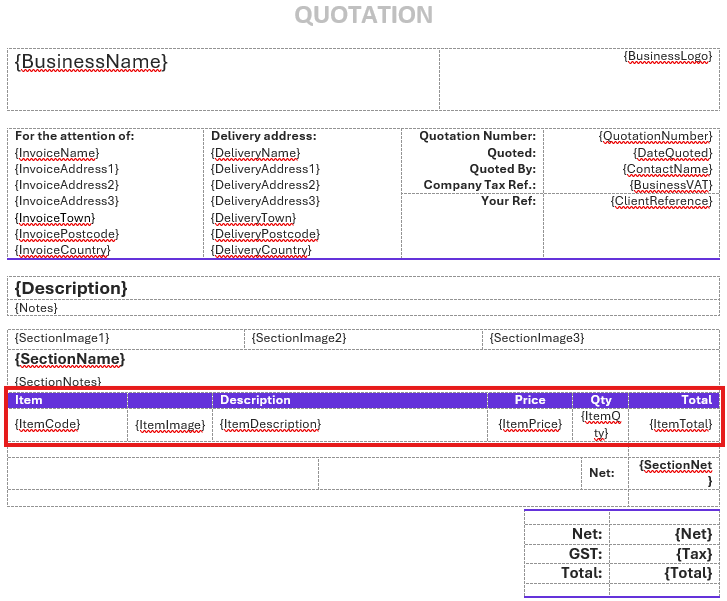
The item table in this template resolves to this:

Learn more: document templates in Zigaflow
Frequently asked questions
Was this helpful?