Win work
Copy a quotation
The short answer
To copy a quotation in Zigaflow, open the quotation, click the status button, and choose Copy. This makes a complete copy with a new quotation number. You can also pick Copy as Linked Quotation or Copy via Pre-Build. Copying suits repeat quotes.
Steps
Open the Quotation and Click on the status button

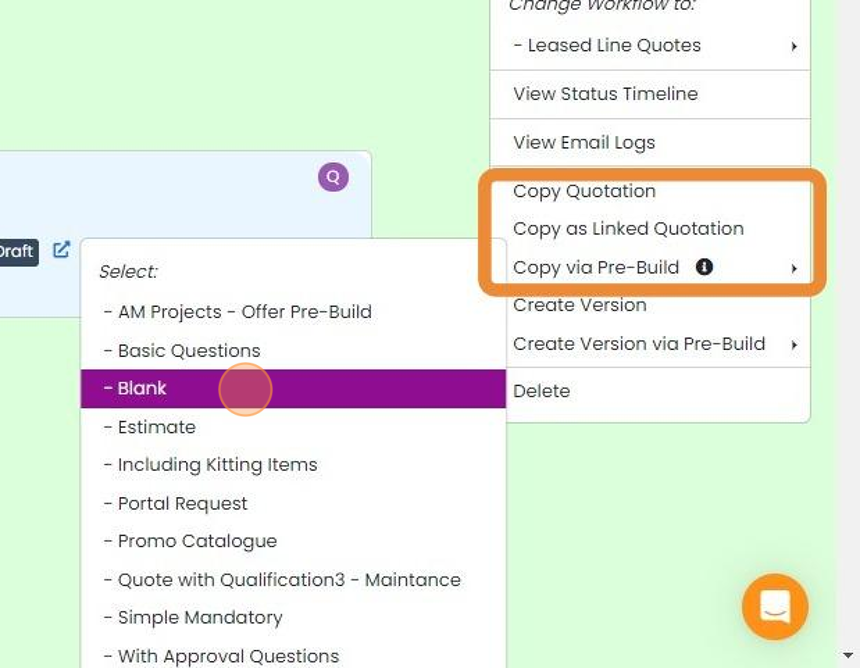
Click on your required outcome
Copy - A complete copy with a new quotation number
Copy as Linked Quotation - A complete copy with a new quotation number but linked to the original
Copy via Pre-Build - This is a complete copy but is set up with automated messages and tasks from the selected pre-build


This is ideal for when the quote is a repeat. When the customer requests changes, create a new version instead.
Frequently asked questions
Next step
Every planWas this helpful?